Showing posts with label Tools. Show all posts

Tuesday, December 18, 2012

Shrink DB log file

USE dbname;
GO
-- Truncate the log by changing the database recovery model to SIMPLE.
ALTER DATABASE dbname
SET RECOVERY SIMPLE;
GO
-- Shrink the truncated log file to 1 MB.
DBCC SHRINKFILE (2, 1);  -- here 2 is the file ID for trasaction log file,you can also mention the log file name (dbname_log)
GO
-- Reset the database recovery model.
ALTER DATABASE dbname
SET RECOVERY FULL;
GO

Saturday, December 25, 2010

Log Viewer Pro

Many years I’m use the best file manager Total Commander (Windows commander in the past). In the home site was found link to the site http://www.totalcmd.net which include additional plugins and utilities. But I would  present only one very usability utility – Log Viewer Pro.  Current application dedicated to viewing logs and available to using in every text file . Every level of Log may be define in different color, a program is free (for home users) and not required install.

Screenshot:

Main features of viewer:
Fast scrolling, eats low memory.
Supports any file size (4 Gb and larger).
Multitabbed interface.
Auto-reload file, Follow tail mode.
Allows to highlight some lines (e.g. "errors", "warnings").
Allows to view encodings: ANSI, OEM, Unicode LE, Unicode BE etc.
File search (both forward and backward).

Download here.

Size: 650 KB
Author: Alexey Torgashin

Monday, January 28, 2008

The Chart free generation for Web Application from Google

Google Provided addition tool for Web developers  - The Google Chart API.

You can create a charts in very simple way - build necessary URL and will receive chart in one of 5 types (Line, Bar, Pie, Venn or Scatter).

A simple "pie" for example:

URL = "http://chart.apis.google.com/chart?
cht=p3&chco=4C8ED6&chs=250x120&
chl=Sun|Mon|Tue|Wed|Thu|Fri|Sat&chd=s:ABCDEFG"

and a result:


In your control next chart parameters: Data, Type, Colors, Labels, Style, Character mappings and several optional parameters.

To Home Page click HERE

Thursday, November 08, 2007

ADInsight - new utility by Microsoft

ADInsight is an LDAP (Light-weight Directory Access Protocol) real-time monitoring tool aimed at troubleshooting Active Directory client applications. Use its detailed tracing of Active Directory client-server communications to solve Windows authentication, Exchange, DNS, and other problems.

Homepage

Download (720kb)

kick it on DotNetKicks.com

Sunday, October 21, 2007

Listas - new feature from Microsoft

At Live Labs, we are always experimenting with new ideas that we think will be useful.  Today we are releasing our latest technology preview:

Listas (http://listas.labs.live.com)

Listas is a tool for the creation, management and sharing of lists, notes, favorites, and more. It allows you to quickly and easily edit lists, share them with others for reading or wiki-style editing, and discover the public lists of other users.  We encourage you to try using it for meeting notes, bookmarks, shopping lists, to plan a night out, or whatever other creative ways you can think of....

kick it on DotNetKicks.com

Sunday, October 14, 2007

Sharp Cache Session Manager

The SharpCacheSessionManager is a HttpHandler that allows to display the entries stored in the Cache, Session and Application object. You can view the data stored inside the objects and you can also remove the objects from the corresponding storage. To download the SharpCacheSessionManager click HERE

via Christopher Steen

 kick it on DotNetKicks.com

Sunday, October 07, 2007

A Visual Guide to Version Control

A beautiful, "highly visual" overview of Version Control, (a.k.a. Source Control). It also references Subversion command line examples, but the overview applies to most version control systems by BetterExplained.

To read a full article click HERE.

Wednesday, September 05, 2007

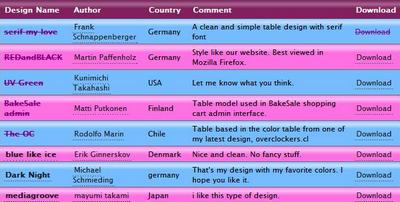
CSS Table Gallery

Candy style
CSS Candy style

Red and Black style
CSS Red and Black style

The OC style
CSS The OC style

To more styles click here

Sunday, August 26, 2007

Online Regular Expression creator and validator.

Nice site NRegex propose online service, that creates and helpful to create regular expressions.

Release of Download Center for IIS

 DownloadCENTER  is a community for research,  sharing, reviewing and promoting IIS. Tools, samples, extensions, filters, modules & etc in a single place.

Thursday, August 16, 2007

The latest release of Notepad++ (Version v4.2.2) is available


   Notepad++ is a free source code editor (and Notepad replacement), which supports several programming languages, running under the MS Windows environment. I use this notebook for many years and was very pleased. Simple and easy! Ideally HTML, XML, Log Editor and Viewer. Very useful tool. Recommended for all!


Here are the features of Notepad++ :

Syntax Highlighting and Syntax Folding

Supported languages :

C C++ Java C# XML HTML PHP CSS makefile ASCII art (.nfo)  doxygen ini file batch file Javascript ASP VB/VBS  SQL Objective-C  RC resource file Pascal Perl Python
Lua TeX TCL Assembler Ruby Lisp Scheme  Properties Diff Smalltalk Postscript VHDL Ada  Caml AutoIt KiXtart Matlab Verilog Haskell InnoSetup CMake

WYSIWYG

User Defined Syntax Highlighting

Auto-completion

Multi-Document

Multi-View

Regular Expression Search/Replace supported

Full Drag ‘N' Drop supported

Dynamic position of Views

File Status Auto-detection

Zoom in and zoom out

Multi-Language environment supported

The Chinese, Japanese, Korean, Arabic and Hebrew Windows environments are supported.
Bookmark

Brace and Indent guideline Highlighting

Macro recording and playback


Screenshots:

 HomePage

 Download page


kick it on DotNetKicks.com

Monday, August 13, 2007

List of commands for F1-F9 for command prompt

List of F1-F9 Key Commands for the Command Prompt

F1 / right arrow: Repeats the letters of the last command line, one by one.
F2: Displays a dialog asking user to “enter the char to copy up to” of the last command line
F3: Repeats the last command line
F4: Displays a dialog asking user to “enter the char to delete up to” of the last command line
F5: Goes back one command line
F6: Enters the traditional CTRL+Z (^z)
F7: Displays a menu with the command line history
F8: Cycles back through previous command lines (beginning with most recent)
F9: Displays a dialog asking user to enter a command number, where 0 is for first command line entered.
Alt+Enter: toggle full Screen mode.
up/down: scroll thru/repeat previous entries
Esc: delete line
Note: The buffer allows a maximum of 50 command lines. After this number is reached, the first line will be replaced in sequence.

Helpful accessibility keyboard shortcuts

Switch FilterKeys on and off. Right SHIFT for eight seconds
Switch High Contrast on and off. Left ALT +left SHIFT +PRINT SCREEN
Switch MouseKeys on and off. Left ALT +left SHIFT +NUM LOCK
Switch StickyKeys on and off. SHIFT five times
Switch ToggleKeys on and off. NUM LOCK for five seconds…..Source

by Geek Zone

Thursday, August 09, 2007

Manual how-to use Subversion and Tortoise SVN with Visual Studio and .NET

This article is a quick step by step for tuning up Subversion with Tortoise SVN. This walkthrough is general with a slight side concentrated on operation with .NET and Microsoft Visual Studio projects. It covers repository creation, creating new source control branches for projects, creating a local copy and the basics of common operations. Focus is on getting up and running quickly with the essential steps.

Sunday, July 29, 2007

The Redesigned Microsoft ASP.NET Web site

The ASP.NET Web site is dedicated to providing developers with the tools, information, and support needed to stay at the leading edge of Web development.


Click Here

Thursday, July 12, 2007

Wednesday, July 11, 2007

Powerful/Free Download: Refactor! for ASP.NET 2.2

Refactor! for ASP.NET version 2.2 is shipping. Built by Developer Express, this FREE code refactoring tool includes 29 time-saving refactorings and is available to all developers working in Visual Studio 2005 and Orcas Beta 1.
Link

Tuesday, June 19, 2007

Using TortoiseSVN with Team Foundation Server

This is a new and very interesting project at CodePlex. This bridge allows clients (such as TortoiseSVN) work against a TFS server. This is a group of developers CodePlex itself because of the popularity of clients. The bridge works at the protocol, making SVN protocol TFS protocol and vice versa. The development is in its infancy and it is monitored.
Link