Link To Site
Tuesday, February 13, 2007
Monday, February 12, 2007
IE7pro - an extension for IE 7

IE7pro is an extension for IE 7, which increases functionality by adding :-Fast proxy servers, Modification identification line browser, expanded dran n record, the manager, safe browsing web pages, - Fast Save graphics, and more.
Freeware ~ 0.5 MB
Download
Home page
Tuesday, January 30, 2007
Visual C# 2005 Keyboard Shortcut Reference Poster
Visual C#, Visual Basic and Visual C++ 2005 Keyboard Shortcuts Reference Posters
If you prefer not to take your hands off the keyboard when working in Visual Studio, then you will appreciate this post. You can download and print for your convenience color posters of shortcuts:

Download C# color poster

Download C++ color poster

Download VB color poster
If you prefer not to take your hands off the keyboard when working in Visual Studio, then you will appreciate this post. You can download and print for your convenience color posters of shortcuts:

Download C# color poster

Download C++ color poster

Download VB color poster
Sunday, December 24, 2006
Maximum URL length in HTTP request.
Previously, there were limitations on the maximum length of URL - 256 characters.
But now, in HTTP 1.1 length of URL is 2,083 characters.
Limiting only to GET. For POST a length is not limited.
Original
But now, in HTTP 1.1 length of URL is 2,083 characters.
Limiting only to GET. For POST a length is not limited.
Original
Monday, December 11, 2006
Custom object and ToString()
It is known that in the C # any object can be shown in the form of string by the method ToString () but what to do if you need to make such an operation with custom object?
That is one solution :
Output:

That is one solution :
public int Id
{
get { return id; }
set { id = value; }
}
private string name;
public string Name
{
get { return name; }
set { name = value; }
}
private DateTime birthday ;
public DateTime Birthday
{
get { return birthday ; }
set { birthday = value; }
}
//Constructor
public Customer()
{
this.id = 5;
this.name = "John Smith";
this.birthday = new DateTime(1945, 10, 12);
Console.WriteLine(this.ToString());
}
To continue press "read more"....
public override string ToString()
{
StringBuilder builder = new StringBuilder();
Type type = this.GetType();
PropertyInfo[] propertiesInfo =
type.GetProperties();
foreach (PropertyInfo property in propertiesInfo)
{
builder.AppendFormat("{0} = {1} \n",
property.Name,
property.GetValue(this, null));
}
return builder.ToString();
}
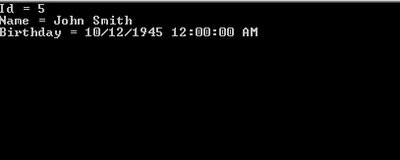
Output:

Thursday, November 30, 2006
Writing log message to file via Message Queue
using System;
using System.Configuration;
using System.Messaging;
using System.IO;
namespace Test
{
public class QSend
{
private System.Messaging.MessageQueue mq;
private string exQ;
public QSend()
{
try
{
mq = new System.Messaging.MessageQueue(
@".\Private$\MyQ");
LogItems inLogItems = new LogItems();
inLogItems.FileName = @"d:\mgslog\Log.txt";
inLogItems.Message = " my message";
mq.Send(inLogItems);
}
catch(MessageQueueException ex)
{
exQ = ex.Message;
}
}
}
public class QRecieve
{
private System.Messaging.MessageQueue mq;
private string exQ;
public QRecieve()
{
try
{
mq = new System.Messaging.MessageQueue (@".\Private$\MyQ");
mq.Formatter =
new System.Messaging.XmlMessageFormatter (
new Type[] {typeof (LogItems)}) ;
System.Messaging.Message msg = mq.Receive();
LogItems outLogItems = (LogItems) msg.Body;
using( StreamWriter sw =
new StreamWriter(outLogItems.FileName,true))
{
sw.WriteLine(DateTime.Now.ToString()
+ outLogItems.Message);
sw.Flush();
}
}
catch(MessageQueueException e)
{
exQ = e.Message;
}
}
}
public class LogItems
{
private string _fileName;
private string _message;
public string FileName
{
get {return _fileName;}
set {_fileName = value;}
}
public string Message
{
get {return _message;}
set {_message = value;}
}
}
}
Tuesday, November 21, 2006
Convert any possible type to T in .Net 2005
private T TryConvert <T>(object o, T defaultValue, bool isThrowException)
{
T convertedValue = defaultValue;
try
{
if (o != null)
{
convertedValue = (T)Convert.ChangeType(o, typeof(T));
}
else
throw;
}
catch
{
if (isThrowException)
{
throw;
}
}
return convertedValue;
}
{
T convertedValue = defaultValue;
try
{
if (o != null)
{
convertedValue = (T)Convert.ChangeType(o, typeof(T));
}
else
throw;
}
catch
{
if (isThrowException)
{
throw;
}
}
return convertedValue;
}
How to use:
Let us suppose you have HttpRequest with some parameters:
ID , Name and Flag
Example 1. Simple using
private void Examle()
{
int id =
TryConvert<int>(Request["id"], -1,
true);
string name =
TryConvert<string>(Request["name"], string.Empty,
true);
bool flag =
TryConvert<bool>(Request["Flag"], default(bool),
true);
}
Example 2. Using in enum
public enum Week
{
Monday,
Tuesday,
Wednesday,
Thursday,
Friday,
Saturday,
Sunday
}
private void Examle2(Week w)
{
Week day = TryConvert<Week>(w, Week.Sunday, true);
}
Thursday, October 26, 2006
NMock
NMock is a dynamic mock object library for .NET. Mock objects make it easier to test single components—often single classes—without relying on real implementations of all of the other components. This means we can test just one class, rather than a whole tree of objects, and can pinpoint bugs much more clearly.
Home page
Home page
Comparison of logging services.
We have lead comparison 3 popular services:
Microsoft Enterprise Library
Log4net
Syslog
The scenario of the test:
1. Reading of a line from a DB.
2. Record of a line in a DB.
Here results on 500 inquiries:
Microsoft Enterprise Library
Log4net
Syslog
The scenario of the test:
1. Reading of a line from a DB.
2. Record of a line in a DB.
Here results on 500 inquiries:
| Log4Net | Enerprise Library | Syslog | |
| Concurrency Level | 25 | 25 | 25 |
| Time taken for tests | 1.617758 seconds | 1.794552 seconds | 1.270281 seconds |
| Complete requests | 500 | 500 | 500 |
| Failed requests | 0 | 0 | 0 |
| Write errors | 0 | 0 | 0 |
| Total transferred | 566968 bytes | 701000 bytes | 695000 bytes |
| Requests per second | 309.07 [#/sec] (mean) | 278.62 [#/sec] (mean) | 393.61 [#/sec] (mean) |
| Time per request | 80.888 [ms] (mean) | 89.728 [ms] (mean) | 63.514 [ms] (mean) |
| Time per request(mean, across all concurrent requests) | 3.236 [ms] | 3.589 [ms] | 2.541 [ms] |
| Transfer rate | 341.83 Kbytes/sec] | 381.15 [Kbytes/sec] | 533.74 [Kbytes/sec] |
Wednesday, September 20, 2006
HttpHandler in WebSite VS 2005
This example intended to case, when classes located in App_Code.
HttpHandler:
public class TestHandler : IHttpHandler
{
public TestHandler() {}
public void ToDo()
{
//....
}
public bool IsReusable
{
get { return true; }
}
void IHttpHandler.ProcessRequest(
HttpContext context)
{
ToDo();
}
}
Web.Config:
<httpHandlers>
<add path="test.test" verb="*"
type="TestHandler, App_Code" />
</httpHandlers>
Thursday, July 27, 2006
Add an uninstall and him shortcut to .NET deployment project in VS2005
1. Create simple project UninstallApp.
2. Add in Main()
{
string[] arguments = Environment.GetCommandLineArgs();
foreach(string argument in arguments)
{
string[] parameters = argument.Split('=');
if (parameters[0].ToLower() == "/u")
{
string productCode = parameters[1];
string path = Environment.GetFolderPath(Environment.SpecialFolder.System);
Process proc = new Process();
proc.StartInfo.FileName = string.Concat(path,"\\msiexec.exe");
proc.StartInfo.Arguments = string.Concat(" /i ", productCode);
proc.Start();
}
}
3. Create new setup project
4. Add UninstallApp.exe to "Application Folder" in 'File System' part
5. In "User's Program menu" create shortcut to UninstallApp.exe and in properties of this shortcut in parameter 'arguments' insert value "/u=[ProductCode]".
6.Rebuild deployment project.
Good luck ;)
2. Add in Main()
{
string[] arguments = Environment.GetCommandLineArgs();
foreach(string argument in arguments)
{
string[] parameters = argument.Split('=');
if (parameters[0].ToLower() == "/u")
{
string productCode = parameters[1];
string path = Environment.GetFolderPath(Environment.SpecialFolder.System);
Process proc = new Process();
proc.StartInfo.FileName = string.Concat(path,"\\msiexec.exe");
proc.StartInfo.Arguments = string.Concat(" /i ", productCode);
proc.Start();
}
}
3. Create new setup project
4. Add UninstallApp.exe to "Application Folder" in 'File System' part
5. In "User's Program menu" create shortcut to UninstallApp.exe and in properties of this shortcut in parameter 'arguments' insert value "/u=[ProductCode]".
6.Rebuild deployment project.
Good luck ;)
Friday, June 16, 2006
ILoveJackDaniels.com
ILoveJackDaniels.com This is very good site for Web Programmers. If you use in CSS,PHP,MySQL,ASP / VBScript,mod_rewrite,JavaScript,HTML Character Entities,RGB Hex Colours you must to add this site to your favorites. Also very recomended to web developers in any platform.
Sunday, June 04, 2006
Buttons
Here extremely simple service for creation of buttons "On the fly"...
http://www.buttonator.com/
Clean AJAX
*AJAX - Asynchronous JavaScript and XML.
Clean AJAX - is an open source engine for AJAX which, is technology of creation asynchronous HTTP requests. Clean AJAX is open source and released under a GNU General Public License, download is available from souceforge.
For more information : Click here
Clean AJAX - is an open source engine for AJAX which, is technology of creation asynchronous HTTP requests. Clean AJAX is open source and released under a GNU General Public License, download is available from souceforge.
For more information : Click here
Wednesday, May 17, 2006
Event Log Explorer
The small freeware utility for monitoring and the subsequent analysis of the events which have been written down in system log of operational systems of family Windows NT (NT/2000/XP/2003). It is called to expand functionality of built in component Event Viewer from OS and to add new opportunities its Interface it is extremely simple, divided for convenience into two windows. In left the tree of magazines (by default in Windows XP them three is displayed: for appendices, safety and system), and in right - tables with brief data on events, somehow: date, time, a code of event, a source and other. The arrangement of windows in the right half is limited by nothing, it is possible to look through simultaneously set of logs without restrictions. Probably to organize the selected lists for the separate computers connected through removed access on a network. Functions archiving old logs are supported, there is an advanced system of a filtration by various criteria and text search, and also the expanded functions of a press and export to various formats (HTML, TXT or in Excel). The program is very useful, as by means of it it will be much easier (unlike a standard browser of events Windows) to trace failure of this or that appendix, systems or the driver.
Download(1.0 MB)
Download(1.0 MB)
Wednesday, May 10, 2006
HTMLCrypt 2.60
HTMLCrypt is a software to protect your web pages and prevent others from viewing and reusing your web page source code, including HTML source code, JavaScript, VBScript, text, links and graphics, thus protect your hard work and unique design on the web. In addition to encrypt the source code and make it impossible for people to read, HTMLCrypt also takes some additional measures to further protect your web page, such as disable right mouse click, disable link display in status bar, disable text selection, disable off-line use, disable page printing, etc. The protected page by HTMLCrypt will have the same appearance as the original one.
Download
Download
Thursday, May 04, 2006
SqlDependency in VS.NET 2005
SqlCommand command = new SqlCommand("Select * from Table");// Clear any existing notifications command.Notification = null;...// Create the dependency for this command SqlDependency dependency = new SqlDependency(commmand); // Add the event handlerdependency.OnChange += new OnChangeEventHandler(OnChange);voidOnChange(object sender, SqlNotificationEventArgs e){ SqlDependency dependency = sender as SqlDependency; dependency.OnChange += OnChange; //Handler for Object OnAnyEvent();}Monday, May 01, 2006
Storing Code Snippets in VS.NET
Add a code snippet to a tab of the Toolbox as follows:
- 1.Select the code snippet in the code file
- 2.Copy the text.
- 3.Click the desired tab on the Toolbox.
- 4.Right-click the area below the tab.
- 5.Select "Paste" from the context menu.
Subscribe to:
Posts (Atom)