Gaston Milano published a tool for the management MSBuild script.
Try it! Thanks!
Sunday, April 22, 2007

Saturday, April 21, 2007
Convert ASCII to Unicode in C#
private string Convert(int asciiCode)
{
Encoding ascii = Encoding.UTF32;
char c = (char)asciiCode;
Byte[] b = ascii.GetBytes(c.ToString());
return ascii.GetString((b));
}
{
Encoding ascii = Encoding.UTF32;
char c = (char)asciiCode;
Byte[] b = ascii.GetBytes(c.ToString());
return ascii.GetString((b));
}

WinMerge - visual text file differencing and merging tool.
Great tool for visual comparison text documents in Windows to change them. WinMerge know how to work with DOS, UNIX and MAC file formats, supports Unicode and has Syntax. It might be very useful, for example, to determine what has changed in one version of the draft over another, as well as for mergers changes to the various versions. Integrates into the Windows shell. Supported expansion plugins.
WinMerge is open-source code and distributed under licence GNU / GPL.
HomePage
Screenshots


More screenshots
Download WinMerge 2.6.6

WinMerge is open-source code and distributed under licence GNU / GPL.
HomePage
Screenshots


More screenshots
Download WinMerge 2.6.6
Wednesday, April 18, 2007
C# 2.0 Nullable Data Readers
.NET 2.0 introduced nullable types into the CLR which, for the first time, provided the ability for value types to be assigned a null value. However, ADO.NET 2.0 did not introduce any new features specifically for dealing with nullable types. Therefore, one of the primary goals for the classes presented in this article is to provide a simple API for working with nullable types within the persistence layer.
Link
Link
Thursday, April 12, 2007
Monday, April 09, 2007
Foxit PDF Reader Pro
Foxit PDF Reader Pro 2.0 Build 1606 is a freeware program for viewing PDF files. Excellent replacement Acrobat Reader. Compact and fast working programme for the documentary PDF format that does not require the large, and therefore slow launching Adobe Reader. Releases and copy text to the clipboard, as well as to search on the text. Normally working with any language.
Home Page (1.8 MB)
Download
New Features
Foxit Reader 2.0 introduces many exciting new features listed below:
- Interactive form filler: Now you don’t have to print out PDF forms first and then manually fill out paper forms. Instead, you can use PC to fill out interactive forms directly, and then print them out, save them, email them or export the form data into FDF file for further processing.
- Multi-language UI that can be dynamically switched: The user interface of Foxit Reader now can be switched to different languages dynamically, thanks to the generous help from our user community.
- On-demand download of add-on: With add-ons, the function of Foxit Reader can be extended unlimitedly. New function modules and seldom used modules are packed as add-on. Users only download them when needed. Foxit Reader highly respects the security and privacy of users and will never connect to Internet without users’ permission. While Acrobat Reader often silently connect to the Internet in the background.
- Self-upgrade: In the past, when you want to upgrade Foxit Reader, you have to frequently visit Foxit website, check for new release, and then manually download the new version, uninstall the old version and re-install the new version. Now this whole process is simplified and you only need to click on the menu item “Check for update now”.
- Javascript support: Advanced users are able to use Javascript to create complex logic for PDF forms, to validate user input and process data.
- Improved printing speed: Printing a PDF file with many images in it to a PostScript printer used to be slow. Version 2.0 has been optimized for such printing.
- Streamlined UI: Version 2.0 comes with a neat UI. Annotation tool buttons are grouped together, instead of being showed on several toolbars.
Free Reader
Foxit Reader 2.0 itself is free. For add-ons, the critical add-ons are free while advanced add-ons are non-free. For example, you can use the following functions for free:
- View or print PDF document
- Fill out PDF forms and save them
- Convert PDF document into text file
- Critical add-ons, such as UI language package, JPEG2000/JBIG decoder, CJK package, GDI+ for early Windows version, etc
The followings are several examples of non-free, advance add-ons:
- You can try out annotation tool for free. However when you save the annotated document, it will be stamped with an evaluation mark on the top-right corner of the annotated pages. If you purchase a Pro Pack add-on, then there will be no evaluation mark.
- Foxit Converter which allows you to convert non-PDF file into PDF file is non-free.
- Foxit Editor which allows you to modify contents of a PDF file is non-free.
Home Page (1.8 MB)
Download
New Features
Foxit Reader 2.0 introduces many exciting new features listed below:
- Interactive form filler: Now you don’t have to print out PDF forms first and then manually fill out paper forms. Instead, you can use PC to fill out interactive forms directly, and then print them out, save them, email them or export the form data into FDF file for further processing.
- Multi-language UI that can be dynamically switched: The user interface of Foxit Reader now can be switched to different languages dynamically, thanks to the generous help from our user community.
- On-demand download of add-on: With add-ons, the function of Foxit Reader can be extended unlimitedly. New function modules and seldom used modules are packed as add-on. Users only download them when needed. Foxit Reader highly respects the security and privacy of users and will never connect to Internet without users’ permission. While Acrobat Reader often silently connect to the Internet in the background.
- Self-upgrade: In the past, when you want to upgrade Foxit Reader, you have to frequently visit Foxit website, check for new release, and then manually download the new version, uninstall the old version and re-install the new version. Now this whole process is simplified and you only need to click on the menu item “Check for update now”.
- Javascript support: Advanced users are able to use Javascript to create complex logic for PDF forms, to validate user input and process data.
- Improved printing speed: Printing a PDF file with many images in it to a PostScript printer used to be slow. Version 2.0 has been optimized for such printing.
- Streamlined UI: Version 2.0 comes with a neat UI. Annotation tool buttons are grouped together, instead of being showed on several toolbars.
Free Reader
Foxit Reader 2.0 itself is free. For add-ons, the critical add-ons are free while advanced add-ons are non-free. For example, you can use the following functions for free:
- View or print PDF document
- Fill out PDF forms and save them
- Convert PDF document into text file
- Critical add-ons, such as UI language package, JPEG2000/JBIG decoder, CJK package, GDI+ for early Windows version, etc
The followings are several examples of non-free, advance add-ons:
- You can try out annotation tool for free. However when you save the annotated document, it will be stamped with an evaluation mark on the top-right corner of the annotated pages. If you purchase a Pro Pack add-on, then there will be no evaluation mark.
- Foxit Converter which allows you to convert non-PDF file into PDF file is non-free.
- Foxit Editor which allows you to modify contents of a PDF file is non-free.
Tuesday, February 20, 2007
Personal Wallpapers and Screensavers for mobile phones
For the first time, the Internet site for a personal wallpapars and screensavers for mobile phones. Absolutely free.
Free mobile phone wallpaper generator
Example:

Free mobile phone wallpaper generator
Example:
Sunday, February 18, 2007
Koders - Source Code Search Engine

Source Code to 32 languages from different License types.
Desktop IDE plugin,
Visual Studio 2003/2005 plugin
Firefox plug-in
Add source code to your site
Home Page

Friday, February 16, 2007

Thursday, February 15, 2007
.NET Cheat Sheets
.NET Format String Quick Reference
Download (PDF) size: 123 KB
ASP.NET 2.0 Page Life Cycle & Common Events
Donwload (PDF) size: 64 KB
Visual Studio 2005 Built-in Code Snippets (C#) Link
ASP.NET Page Life Cycle Diagram Link
Microsoft ASP.NET AJAX Library Download (PDF)
Other cheat sheets Link

Download (PDF) size: 123 KB
ASP.NET 2.0 Page Life Cycle & Common Events
Donwload (PDF) size: 64 KB
Visual Studio 2005 Built-in Code Snippets (C#) Link
ASP.NET Page Life Cycle Diagram Link
Microsoft ASP.NET AJAX Library Download (PDF)
Other cheat sheets Link
Tuesday, February 13, 2007

Monday, February 12, 2007
IE7pro - an extension for IE 7


Tuesday, January 30, 2007
Visual C# 2005 Keyboard Shortcut Reference Poster
Visual C#, Visual Basic and Visual C++ 2005 Keyboard Shortcuts Reference Posters
If you prefer not to take your hands off the keyboard when working in Visual Studio, then you will appreciate this post. You can download and print for your convenience color posters of shortcuts:

Download C# color poster

Download C++ color poster

Download VB color poster

If you prefer not to take your hands off the keyboard when working in Visual Studio, then you will appreciate this post. You can download and print for your convenience color posters of shortcuts:
Download C# color poster
Download C++ color poster
Download VB color poster
Sunday, December 24, 2006
Maximum URL length in HTTP request.
Previously, there were limitations on the maximum length of URL - 256 characters.
But now, in HTTP 1.1 length of URL is 2,083 characters.
Limiting only to GET. For POST a length is not limited.
Original
But now, in HTTP 1.1 length of URL is 2,083 characters.
Limiting only to GET. For POST a length is not limited.
Original
Monday, December 11, 2006
Custom object and ToString()
It is known that in the C # any object can be shown in the form of string by the method ToString () but what to do if you need to make such an operation with custom object?
That is one solution :
Output:
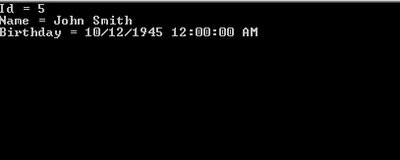

That is one solution :
        public int Id
        {
            get { return id; }
            set { id = value; }
        }
        private string name;
        public string Name
        {
            get { return name; }
            set { name = value; }
        }
        private DateTime birthday ;
        public DateTime Birthday
        {
            get { return birthday ; }
            set { birthday  = value; }
        }


       //Constructor
       public Customer()
       {
        this.id = 5;
        this.name = "John Smith";
        this.birthday = new  DateTime(1945, 10, 12);

        Console.WriteLine(this.ToString());
       }


To continue press "read more"....
public override string ToString()
 {
   StringBuilder builder = new StringBuilder();

   Type type = this.GetType();
   PropertyInfo[] propertiesInfo =
                      type.GetProperties();
   foreach (PropertyInfo property in propertiesInfo)
        {
           builder.AppendFormat("{0} = {1} \n",
                     property.Name,
                    property.GetValue(this, null));
         }

          return builder.ToString();
 }
Output:
Thursday, November 30, 2006
Writing log message to file via Message Queue
using System;
using System.Configuration;
using System.Messaging;
using System.IO;

namespace Test
{
 public class  QSend
 {
  private System.Messaging.MessageQueue mq;
  private string exQ;

  public  QSend()
  {
   try
     {
    mq = new System.Messaging.MessageQueue(
                @".\Private$\MyQ");
    LogItems inLogItems = new  LogItems();
    inLogItems.FileName = @"d:\mgslog\Log.txt";
    inLogItems.Message = " my message";
    mq.Send(inLogItems);
    }
  catch(MessageQueueException ex)
     {
    exQ = ex.Message;
     }
  }
 }

public  class QRecieve
 {
  private System.Messaging.MessageQueue mq;
  private string exQ;

  public QRecieve()
  {
   try
    {
    mq = new System.Messaging.MessageQueue (@".\Private$\MyQ");
                mq.Formatter =
new  System.Messaging.XmlMessageFormatter (
new Type[] {typeof (LogItems)}) ;
    System.Messaging.Message msg = mq.Receive();
    LogItems outLogItems = (LogItems) msg.Body;
      using( StreamWriter sw =
               new StreamWriter(outLogItems.FileName,true))
     {
     sw.WriteLine(DateTime.Now.ToString()
                       + outLogItems.Message);
        sw.Flush();
    }
    }
   catch(MessageQueueException e)
    {
    exQ = e.Message;
    }

 }
}

 public class LogItems
  {
    private string  _fileName;
    private string _message;
    public string FileName
    {
    get {return _fileName;}
    set {_fileName = value;}
    }
    public string  Message
    {
    get {return _message;}
    set {_message = value;}
    }
 }
}

Tuesday, November 21, 2006
Convert any possible type to T in .Net 2005
private T TryConvert <T>(object o, T defaultValue, bool isThrowException)
{
T convertedValue = defaultValue;
try
{
if (o != null)
{
convertedValue = (T)Convert.ChangeType(o, typeof(T));
}
else
throw;
}
catch
{
if (isThrowException)
{
throw;
}
}
return convertedValue;
}
{
T convertedValue = defaultValue;
try
{
if (o != null)
{
convertedValue = (T)Convert.ChangeType(o, typeof(T));
}
else
throw;
}
catch
{
if (isThrowException)
{
throw;
}
}
return convertedValue;
}
How to use:
Let us suppose you have HttpRequest with some parameters:
ID , Name and Flag
Example 1. Simple using
private void Examle()
 {
   int id      =
     TryConvert<int>(Request["id"], -1,
 true);
   string name =
     TryConvert<string>(Request["name"], string.Empty,
 true);
   bool flag   =
     TryConvert<bool>(Request["Flag"], default(bool),
 true);
 }
Example 2. Using in enum
 public enum Week
        {
            Monday,
            Tuesday,
            Wednesday,
            Thursday,
            Friday,
            Saturday,
            Sunday
        }

 private void Examle2(Week w)
{
   Week day = TryConvert<Week>(w, Week.Sunday, true);
}
Thursday, October 26, 2006
NMock
NMock is a dynamic mock object library for .NET. Mock objects make it easier to test single components—often single classes—without relying on real implementations of all of the other components. This means we can test just one class, rather than a whole tree of objects, and can pinpoint bugs much more clearly.
Home page
Home page
Subscribe to:
Posts (Atom)